Select the approved method
Choose the relevant calculation type, project context and controlled template or tool.

Use repeatable calculation workflows for bearing, settlement, piles, slopes and related checks while retaining inputs, outputs, revisions and review status.
Australian geotechnical workflow
A geotechnical calculation needs more than a result. Inputs, assumptions, units, method, model limits, author, checker and revision status all form part of the engineering record. Personal spreadsheets and isolated software outputs make peer review and later retrieval harder.
GeoCRM provides a connected place for calculation workflows and approved outputs. It can standardise repeatable tools and records, while engineers remain responsible for choosing an appropriate method, validating implementation and applying professional judgement.
Elastic settlement
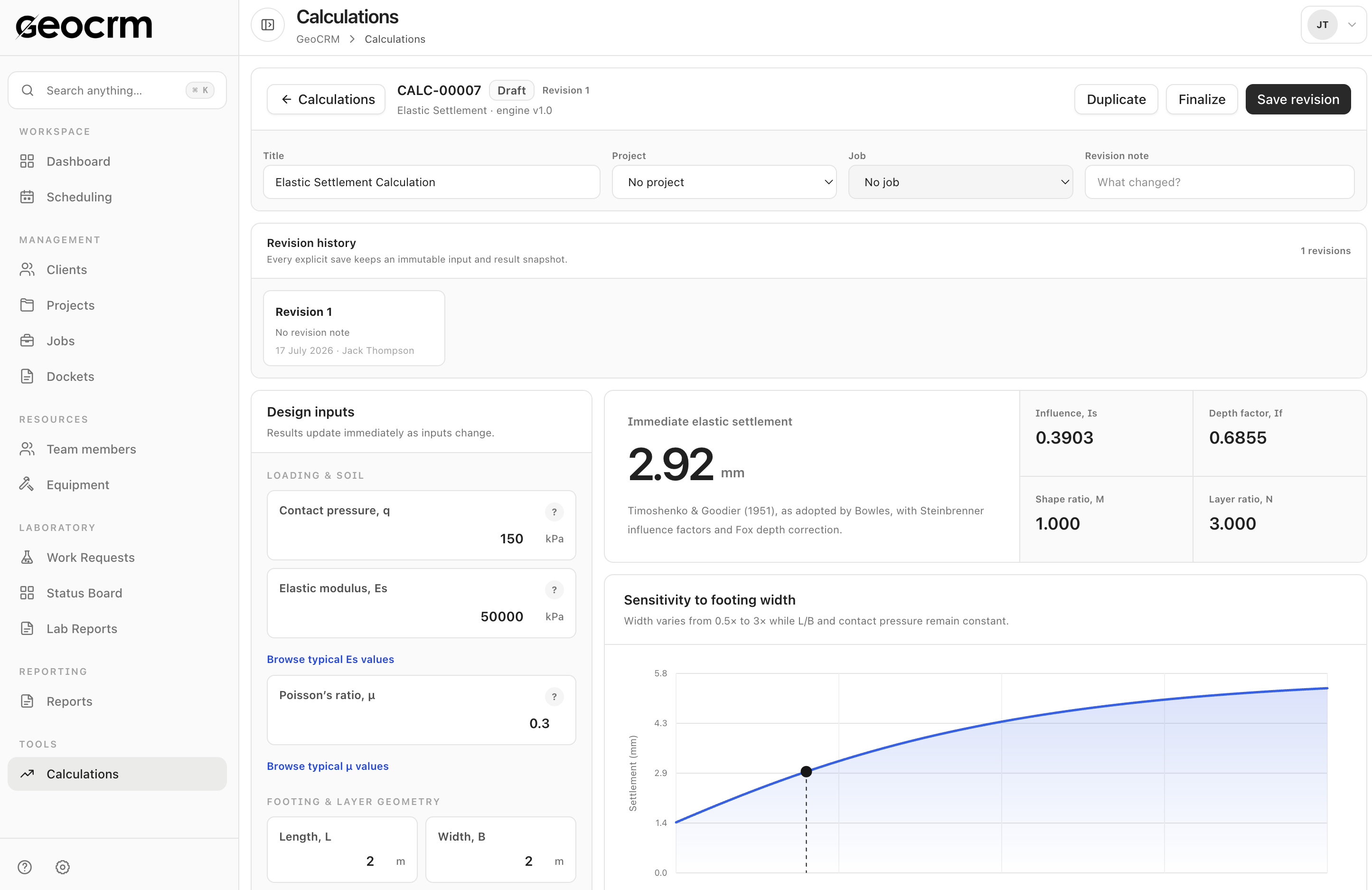
Enter loading, soil and footing geometry inputs and see the immediate elastic settlement result alongside influence factors and a footing-width sensitivity chart. Save the work as a named calculation when it is ready for review.
Search calculations by name, project or job and filter by calculation type or workflow status.
Associate a calculation with the project and job it supports instead of relying on a filename for context.
Each explicit save keeps an input and result snapshot with revision history, author and change notes.
Move calculation work through draft, in-review and final states so its readiness is visible.
Choose the relevant calculation type, project context and controlled template or tool.
Record source parameters, units, scenarios and limitations clearly.
Review intermediate outputs, boundary conditions and sensitivity—not only the final value.
Complete independent review as required and preserve the approved calculation with the project.
Keep the engineering record with the investigation and report it supports.
Reduce ambiguity through structured fields and explicit engineering units.
Make chosen parameters, scenarios and model limitations visible to reviewers.
Use configured tools for recurring calculations without losing project-specific judgement.
Separate preparation, checking and approval responsibilities.
Retain calculation summaries or outputs for report appendices and project files.
Available tools and planned workflows should be reviewed in the product demonstration against your actual engineering needs.
No. Suitability depends on inputs, method, ground model, load cases, limitations and competent engineering assessment.
Selected workflows can be assessed, but formulas and outputs must be validated before operational use.
The workflow can record author, reviewer, comments, revision and approval status.
See it with your own workflow
Bring a real project, schedule, field record, laboratory request or report. We will show how the workflow can be configured without asking you to share confidential client data.